Project Details
- Client : Falchion Consulting
- What We Did : Application Design and Development
- Technologies Used : .NET WPF, PowerShell
SharePoint Farm Builder Application Development
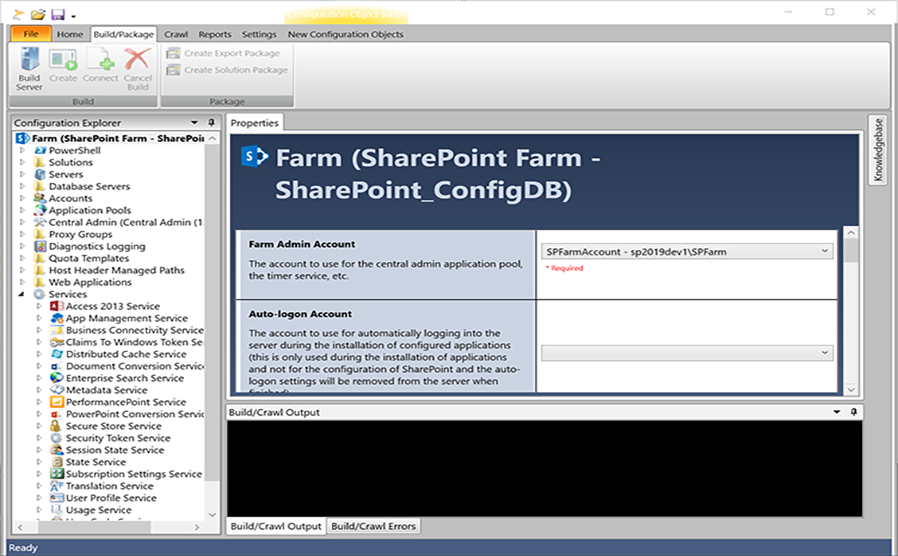
Meeting the high demand for SharePoint On-Premises installations and configurations required developing a specialized tool that could eliminate the time-consuming, error-prone manual processes typically associated with SharePoint deployment. The SharePoint Farm Builder evolved from simple PowerShell scripts into a comprehensive WPF desktop application that handles every aspect of SharePoint farm deployment, configuration, documentation, and validation.
Automated Installation and Configuration
The Farm Builder manages the complete deployment lifecycle, starting with the silent installation of all required dependencies. The application automatically handles prerequisite software installation, ensuring that all necessary components are in place before SharePoint installation begins. Once dependencies are satisfied, it orchestrates the full configuration of SharePoint environments using XML-based configuration files that define every aspect of the farm setup.
This automation saves hours of tedious point-and-click configuration work while ensuring consistency and accuracy across deployments. The application supports all SharePoint product versions from SharePoint 2007 through the latest SharePoint Subscription Edition, making it a versatile tool that adapts to different client requirements and legacy systems.
Visual Configuration Management
The WPF-based user interface provides a visual, intuitive way to manage configuration files without requiring deep XML expertise. The interface offers contextual tips and guidance as administrators define their farm architecture, helping them make informed decisions about topology, service applications, web applications, and other SharePoint components. This visual approach makes complex configurations more accessible while maintaining the precision and flexibility of XML-based definitions.
Configuration Validation and Best Practices
One of the Farm Builder’s most valuable features is its ability to validate configurations before deployment. The application analyzes configuration files against established SharePoint best practices and identifies potential issues, misconfigurations, or opportunities for optimization. This validation capability helps prevent deployment problems and ensures that farms are built on solid foundations from the start.
The tool provides specific recommendations based on industry best practices, alerting administrators to configuration choices that might impact performance, security, or maintainability. This proactive guidance helps organizations avoid common pitfalls and implement SharePoint environments that align with Microsoft’s recommendations.
Integrated Knowledgebase and Contextual Help
The Farm Builder includes a built-in, customizable knowledgebase that provides contextual support throughout the configuration and deployment process. The knowledgebase can be linked to specific configuration pages, providing relevant guidance exactly where administrators need it. Additionally, it integrates with the built-in PowerShell terminal, offering support details for error messages and script output, making troubleshooting faster and more efficient.
This integrated knowledge system captures institutional knowledge and best practices, ensuring that expertise is readily available during deployments regardless of the administrator’s experience level.
Farm Crawling for Replication and Documentation
The crawl feature represents a significant capability that serves multiple purposes. The Farm Builder can crawl existing SharePoint environments to capture their complete configuration, including web applications, service applications, managed paths, site collections, features, solutions, and numerous other settings.
Once crawled, this configuration can be used in two primary ways. First, it can serve as the basis for building a new farm that effectively mirrors the original configuration—invaluable for creating development, testing, or disaster recovery environments that match production settings. Second, the crawled data can be used to generate comprehensive documentation of the existing environment.
Automated Documentation Generation
The Farm Builder can generate complete documentation based on current configurations, whether those configurations were created manually within the tool, loaded from XML files, or captured through farm crawling. This documentation capability transforms configuration data into readable, comprehensive reports that describe the farm architecture, settings, and components.
This automated documentation proves essential for maintaining accurate records of SharePoint environments, supporting compliance requirements, facilitating knowledge transfer, and providing reference materials for troubleshooting and planning.
Real-World Impact
Falchion Consulting has used the SharePoint Farm Builder on dozens of farms across various industries and use cases, from full production deployments to development environments to periodic health checks. The tool has proven its value by consistently reducing deployment time, minimizing errors, ensuring consistency, and providing reliable documentation. What once required days of manual configuration work can now be accomplished in hours, with greater accuracy and comprehensive documentation as built-in benefits.