Project Details
- Client : Enterprise Client
- What We Did : Full-Stack Application Design and Development
- Technologies Used : React, .NET 8, Azure SQL, Oracle, Docker, Kubernetes, SharePoint SPFx
Performance Management Suite Development
A comprehensive suite of enterprise applications was developed to provide organizations with powerful tools for managing service level agreements, tracking task metrics, monitoring operational performance, and integrating data from diverse sources. This interconnected ecosystem of applications shares common architectural patterns, authentication mechanisms, and deployment strategies while addressing distinct business needs across performance management workflows.
Modern Technology Stack
All applications in the suite are built using React for the front-end, providing a responsive and intuitive user interface that works seamlessly across devices. The back-end leverages .NET 8 Web APIs with Entity Framework, connecting to Azure SQL databases for primary data storage. Several applications include optional Oracle database support, providing flexibility for organizations with existing Oracle infrastructure or specific database preferences.
The modern stack ensures high performance, maintainability, and scalability while providing a consistent development and deployment experience across the entire suite.
Enterprise Authentication and Security
A key strength of the suite is its flexible authentication architecture that supports multiple identity providers and authentication mechanisms. All applications support Windows Authentication for integrated corporate environments, Microsoft Entra ID (formerly Azure AD) for cloud-native Microsoft 365 organizations, Okta for companies using that identity platform, and SAML-based authentication for organizations with other identity providers.
The SAML implementation uses a custom-developed SAML Service Provider that handles the complete authentication flow with various Identity Providers. This custom SAML SP manages the authentication handshake with the IdP and returns a JWT token to the calling application, providing a standardized authentication interface regardless of the underlying identity provider. This architecture ensures that users can authenticate using their organization’s existing identity infrastructure without requiring application-specific accounts.
Containerized Deployment with Docker and Kubernetes
All applications in the suite are designed for modern containerized deployment scenarios using Docker and Kubernetes. Each application includes Docker configurations and Helm charts that facilitate deployment into Kubernetes clusters, enabling scalable, resilient hosting that can adapt to changing load demands.
Comprehensive setup documentation and validation scripts accompany each project, ensuring that deployment teams can configure and verify installations efficiently. These materials cover everything from initial cluster setup through application configuration, authentication provider integration, and database connectivity, reducing the time and expertise required for successful deployments.
SLA Management Application
The SLA Management application provides comprehensive functionality for defining, tracking, and managing service level agreements across departments and divisions. Organizations can specify detailed SLAs with associated metrics, scoring criteria, and metadata that define performance expectations and measurement methodologies.
The application includes robust ticket management capabilities, allowing SLA-related work items to be assigned to team members, tracked through their lifecycle, and ultimately approved or rejected based on completion criteria. Detailed reporting provides visibility into SLA compliance, helping organizations identify areas where performance meets or falls short of commitments.
Task Metric Management Application
Built as a specialized variant of the SLA Management application, the Task Metric Management system focuses specifically on task tracking and measurement without the ticket management overhead. This application is ideal for organizations that need to monitor task completion and performance metrics but don’t require the full SLA workflow apparatus.
A distinguishing feature is the ability to associate tasks with physical locations, enabling geographic tracking and analysis of task distribution and completion. This location awareness supports use cases where physical presence or geographic factors influence task execution and performance measurement.
Dashboard Applications
Multiple dashboard applications provide comprehensive reporting and visualization capabilities across the various data sets generated by the suite. These dashboards transform raw data into actionable insights through charts, grids, and specialized visualizations tailored to specific reporting needs.
The Task Metric Dashboard includes Google Maps integration, allowing administrators to associate tasks with locations on an interactive map. This geographic visualization provides intuitive insights into task distribution, completion patterns, and location-specific performance trends.
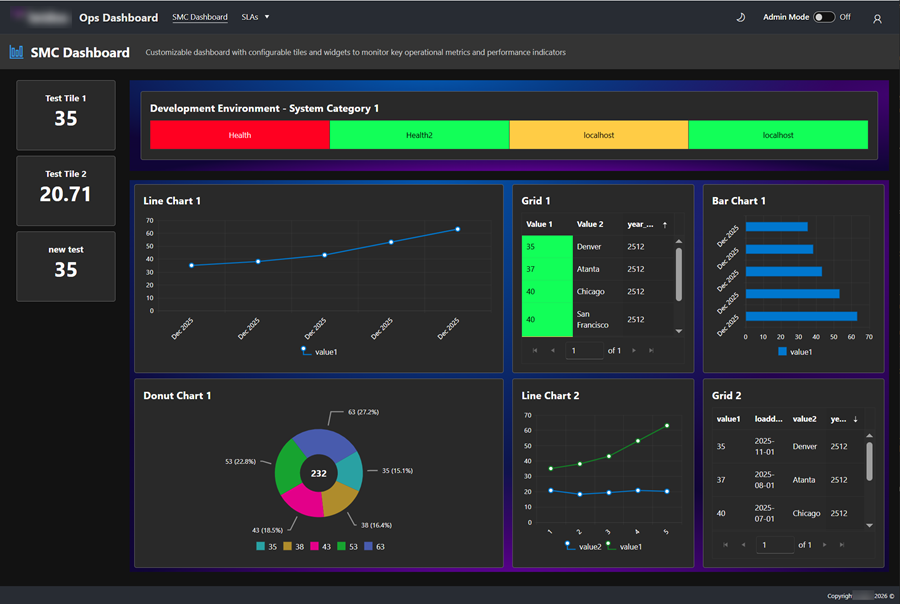
The Ops Dashboard represents a particularly flexible solution, offering a fully customizable interface where users can define page layouts and add various chart and grid components dynamically. Administrators define SQL views that serve as data sources, and users can create personalized dashboards by selecting from available views and choosing appropriate visualization types. This flexibility ensures that different roles and responsibilities can access the specific insights they need without requiring separate custom development.
Connect Data Integration Platform
The Connect application addresses the critical need for integrating data from external systems and APIs into the performance management ecosystem. Administrators configure API endpoints within Connect, defining connection parameters, authentication credentials, and polling schedules. The system then automatically connects to these endpoints on the specified schedule, retrieves data, and stores it in dynamically created database tables.
These tables become available as data sources for reporting and analysis across the dashboard applications, effectively bringing external data into the performance management suite’s analytics capabilities. This integration capability eliminates manual data transfer processes and ensures that reports reflect current information from connected systems.
Connect also supports availability monitoring through user-defined health check endpoints. The system polls these endpoints at configured intervals and provides real-time status information through dedicated dashboards. When systems experience downtime or degradation, visual alerts notify relevant users, enabling rapid response to availability issues.
Excel Extractor Data Import Tool
The Excel Extractor application solves the common challenge of importing data from Excel spreadsheets into structured database formats. Users define templates that specify how Excel files should be processed, mapping columns, defining data types, and specifying transformation rules.
Multiple templates can be created to handle different Excel formats and data structures. When files are processed, the system creates database tables dynamically based on the template definitions and populates them with the imported data. Database administrators can then manually map these dynamically created tables to views, making the imported data available for analysis and reporting within the dashboard applications.
This capability bridges the gap between Excel-based workflows and database-driven analytics, allowing organizations to leverage existing Excel processes while benefiting from the power and flexibility of database-backed reporting.
SharePoint SPFx Web Parts
Recognizing that many enterprise organizations rely heavily on Microsoft 365 and SharePoint Online, a comprehensive suite of SharePoint Framework (SPFx) web parts was developed to extend the performance management capabilities into the SharePoint environment.
An SPFx implementation of the SLA Management application provides equivalent functionality to the standalone application but integrated directly within SharePoint pages, allowing users to manage SLAs without leaving their familiar SharePoint workspace.
Additional specialized web parts include a Kanban board that connects to SharePoint lists or document libraries, enabling visual status tracking and workflow management using native SharePoint data. A tree view web part displays hierarchical data in an intuitive, collapsible format that makes complex relationships easier to navigate and understand.
Content layout web parts enhance the visual presentation capabilities of SharePoint pages, including an enhanced hero web part with extended customization options, an iframe host for embedding external applications, and application-specific web parts that display dashboard data and status information directly within SharePoint sites.
These web parts ensure that users working primarily in Microsoft 365 can access performance management functionality without switching between disparate systems, improving adoption and streamlining workflows.
Integrated Ecosystem
While each application serves distinct purposes, they work together as an integrated ecosystem. Data flows between applications through shared databases and defined integrations, ensuring consistency and enabling comprehensive cross-application reporting. Common deployment patterns and technologies reduce operational complexity and ensure consistent management practices across the suite.
This integrated approach delivers more value than isolated tools, providing organizations with a comprehensive performance management platform that adapts to diverse needs while maintaining architectural coherence and operational simplicity.